
Ambient Methodology
Executive Summary
Workera's Skills Inferencing System introduces continuous, observation-based skill measurement as a complement to Workera's established point-in-time assessment platform.
Where traditional assessments capture what a person can do under test conditions, Skills Inferencing captures what a person actually does in the course of their daily work. The system operates by collecting evidence from workplace tools — Slack conversations, email communications, meeting transcripts, code contributions, and project management activity — classifying that evidence against a structured behavior taxonomy using an LLM-powered evidence-gathering agent, and then scoring each behavior using a fully deterministic, formula-based scoring engine. The architecture enforces a strict privacy boundary: raw evidence never leaves the individual's device, while only numeric scores are transmitted to the organizational dashboard. The current system supports the Observed signal type (from automated scans of workplace tools). Additional signal types — Manager-Rated and Peer-Rated — are planned but not yet implemented. When combined with the Assessed signal from the Workera assessment platform, the system produces skill profiles that grow more reliable over time. This methodology documents the theoretical foundations, technical architecture, scoring methodology, and operational guidance for deploying Skills Inferencing as part of a comprehensive workforce intelligence program.
1. Introduction
1.1 Why Observation-Based Skill Signals
Traditional skill measurement operates on a test-and-report cycle: an individual completes an assessment at a point in time, receives a score, and that score represents their capability until the next assessment. This model, while psychometrically rigorous, suffers from two structural limitations. First, assessments are episodic — they capture a snapshot but miss the continuous evolution of skills that occurs through daily practice. Second, assessments measure potential under controlled conditions, not application in authentic work contexts.
Observation-based skill signals address both limitations. By continuously monitoring how individuals apply skills in their actual work — the prompts they write, the AI tools they deploy, the strategic recommendations they make, the knowledge they share with colleagues — the system builds a living, evolving skill profile. This approach draws on Evidence-Centered Design (ECD), the psychometric framework developed by Mislevy, Steinberg, and Almond (2003), which holds that valid inferences about competence require a principled chain from observable evidence to latent constructs.
In the ECD framework, every inference must be traceable: from an observable work product (a Slack message explaining transformer architecture) through an evidence rule (this constitutes verbal evidence of the "Describe transformers" behavior) to a student model update (the behavior score moves from 0 to 1). Skills Inferencing implements this chain with formal rigor, ensuring that every score change can be audited back to its originating evidence.
1.2 Relationship to Workera's Assessment System
Skills Inferencing is not a replacement for Workera's AI-native assessment and scoring system; it is a complement. The assessment system provides high-validity, proctored measurement of knowledge and applied skill. Skills Inferencing provides continuous, ambient measurement of skill application in authentic contexts. Together, they form a two-lens model:
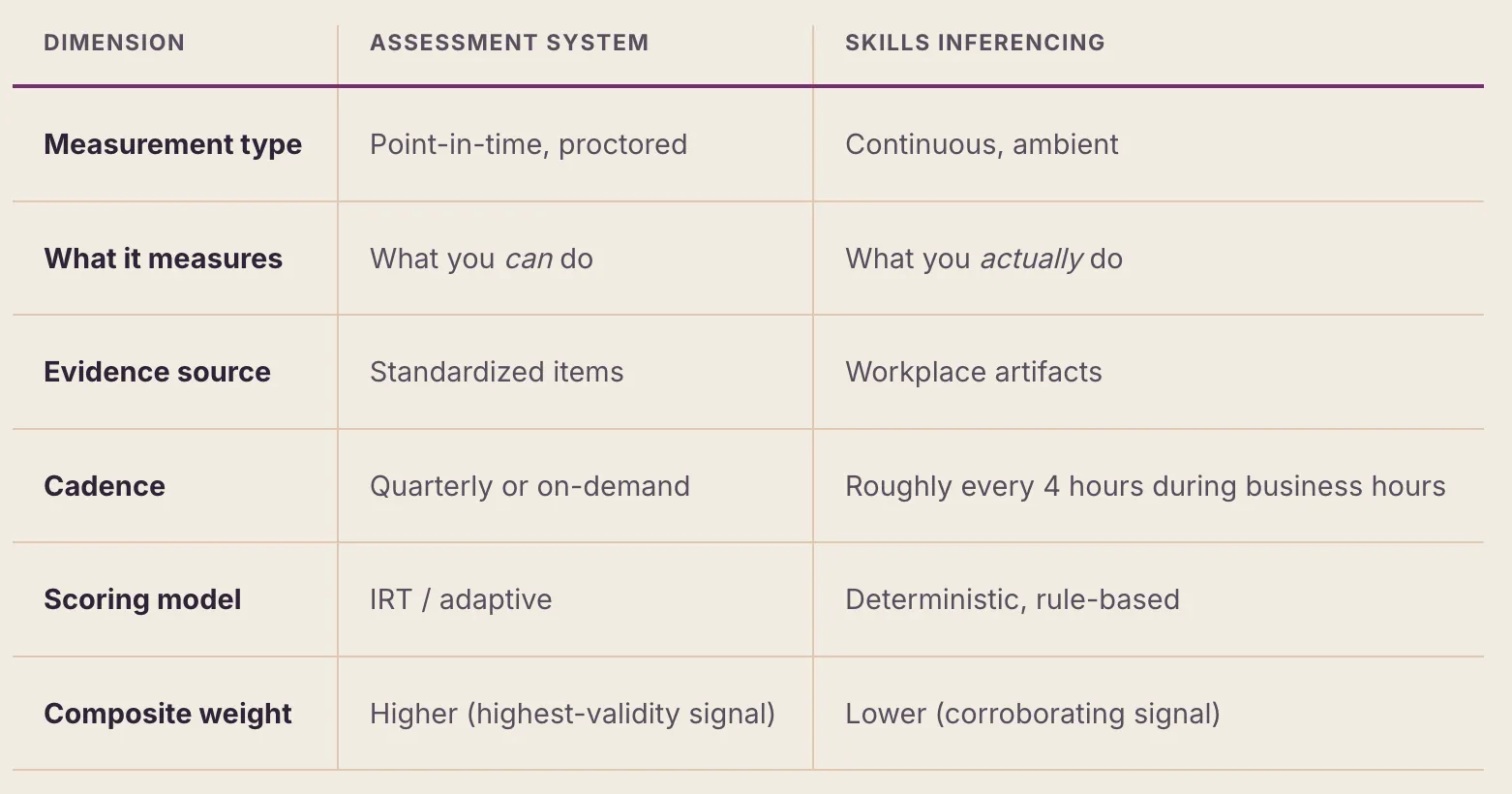
When both signals agree — a person scores well on an assessment and demonstrates the skill in practice — confidence in the inference is high. When they diverge — strong assessment score but no observed application, or vice versa — the gap itself is informative and becomes the basis for targeted development.
1.3 System Model Overview
The Skills Inferencing System comprises two components: an on-device desktop app and a central admin server.
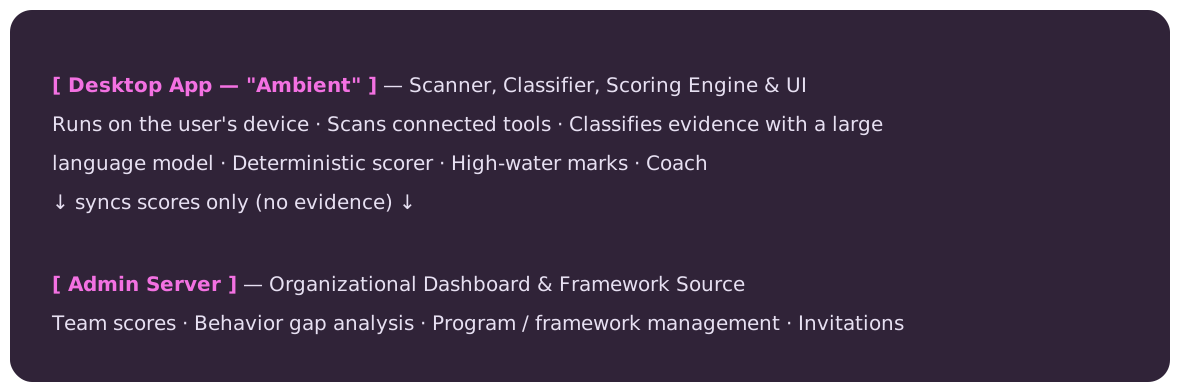
The Desktop App (shipped as Ambient by Workera) runs on the user's machine. On a recurring schedule — by default a few times a day during business hours (Monday–Friday, 9am–6pm) — it scans the user's connected workplace tools on-device. Connections are made through secure, user-authorized connectors, covering tools such as Slack, Gmail, Google Calendar, Google Docs, Google Drive, GitHub, Linear, Asana, Notion, Granola, Zoom, Gong, and the user's own AI-assistant usage. The set of available connectors is extensible rather than fixed.
For each scan the app gathers recent artifacts, then uses a large language model to classify each artifact against the user's behavior taxonomy and assign an evidence type. Classification is the onlyplace AI judgment is used; the model never assigns scores. After classification, the app merges new evidence into the local profile, runs the deterministic scoring formula across the user's assigned behaviors, applies high-water-mark protections, and syncs the resulting scores (without evidence) to the admin server. It also provides the user-facing interface: profile view, a coach tab with personalized growth recommendations, and an activity feed.
The Admin Server is the backend that stores team-level data: people, the organization's program/behavior framework, daily scores, and capability scores. The desktop app fetches each person's assigned behaviors from this server, so the framework is defined centrally and per organization (see Section 5). The server never receives or stores evidence. The admin dashboard provides organizational analytics, behavior gap analysis, and framework management.
2. Multi-Signal Architecture
2.1 Signal Types and Weighting
The Skills Inferencing System is designed to ingest four distinct signal types, each offering a different lens on the same underlying skill constructs. This multi-signal approach is grounded in the psychometric principle that convergent evidence from independent sources produces more reliable inferences than any single measurement method.
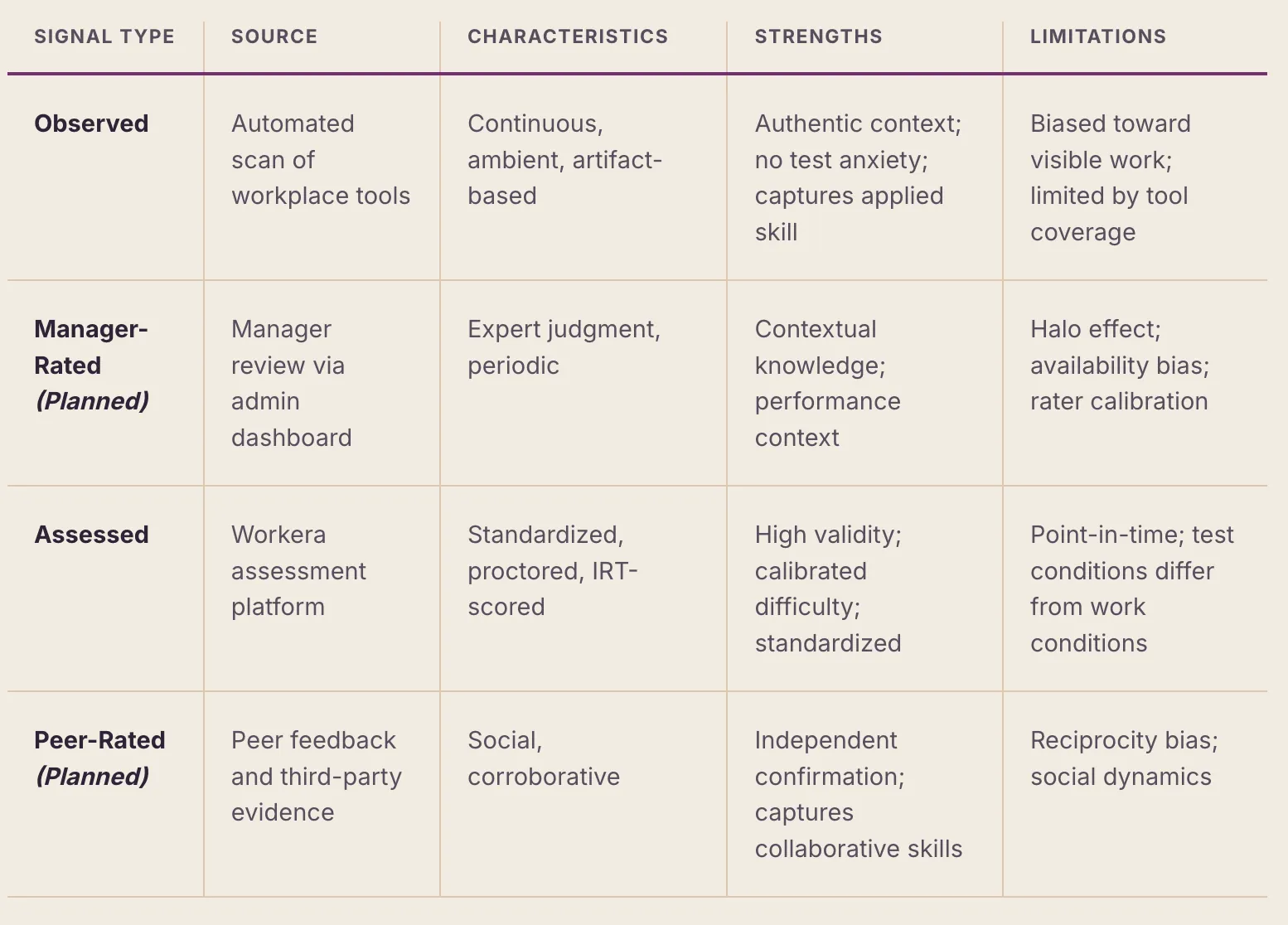
When multiple signal types are available for a given skill area, they are combined into a composite score. Currently, only the Observed signal is implemented; Assessed, Manager-Rated and Peer-Rated are planned. Each signal contributes according to its relative validity and reliability — Assessed highest (standardized and proctored), then Observed (authentic application), then the Manager- and Peer-Rated signals (contextual and corroborating). The exact weights are calibrated over time and normalized across whichever signals are present; in early deployment, observation may be the only signal, in which case the composite is simply the Observed score. The system becomes progressively more reliable as additional signals are added.
3. Evidence-Centered Observation
3.1 Evidence Sources
The system collects evidence from a broad and growing set of workplace tools, each connected through a secure connector that the user authorizes. (Connectors are added over time; the table below lists the most common categories rather than a fixed set.) The more integrations a user has connected, the broader the evidence coverage. Evidence is gathered for whichever behaviors the organization's framework defines — not only AI skills (see Section 5).
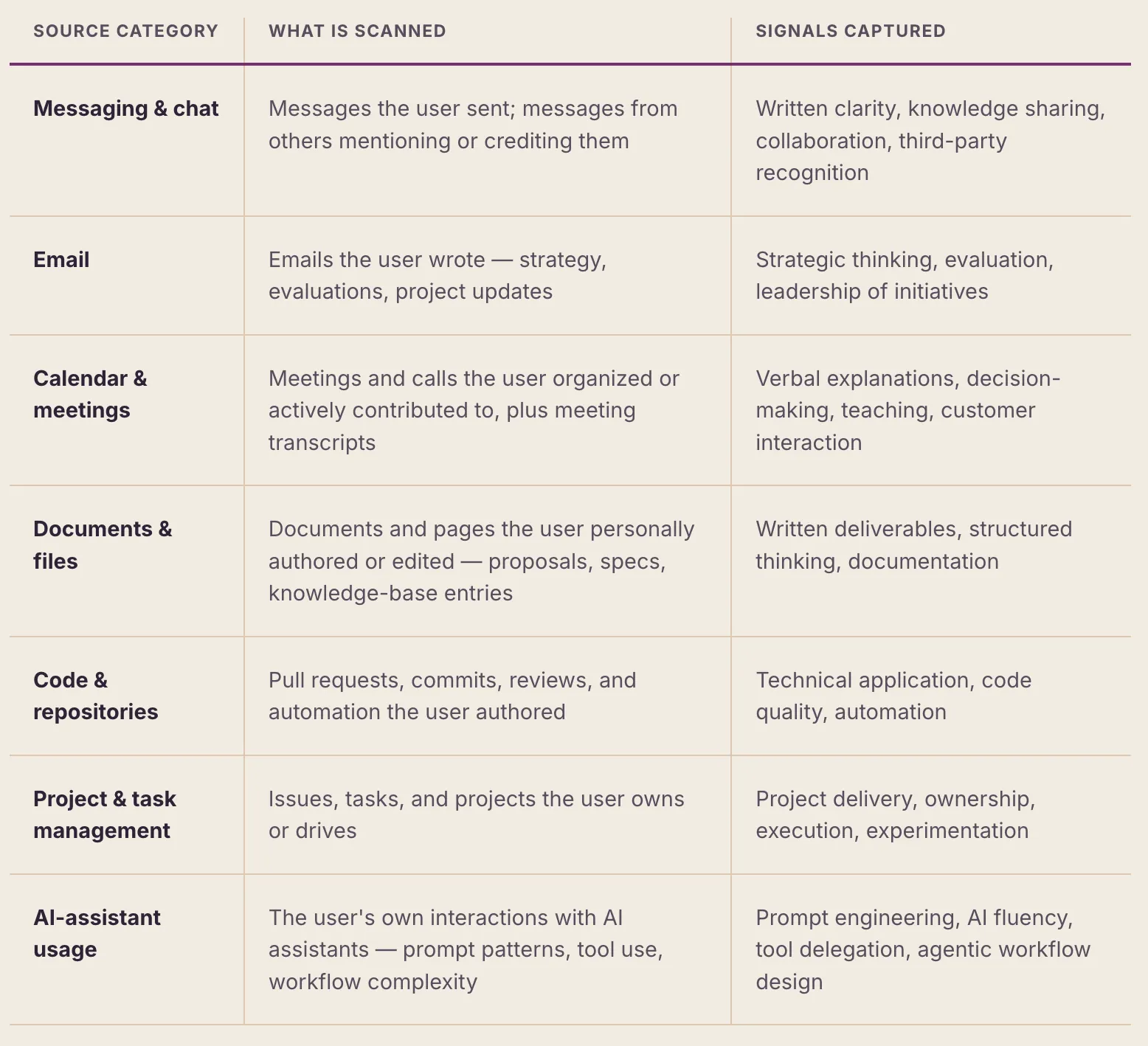
The specific connected tools within each category expand over time. Coverage varies by which connectors each user has authorized.
3.2 Evidence Collection Methodology
Evidence collection runs on-device, inside the desktop app. On a recurring schedule — by default a few times a day during business hours (Monday–Friday, 9am–6pm; the interval is configurable) — the app sweeps all connected tools, fetches recent artifacts, and passes them to a large language model for classification.
The collection process follows a strict methodology:
- Temporal window. Each scan searches for activity since the previous scan (on first run, a short backfill window). This prevents re-processing of evidence and ensures clean deduplication across scans.
- Evidence attribution. Each evidence item records the source, exact timestamp, channel or context, raw snippet (when available), and a second-person description framed as a coach addressing the user ("You explained the difference between GPT-4 and Claude for JSON output in #epd-triad").
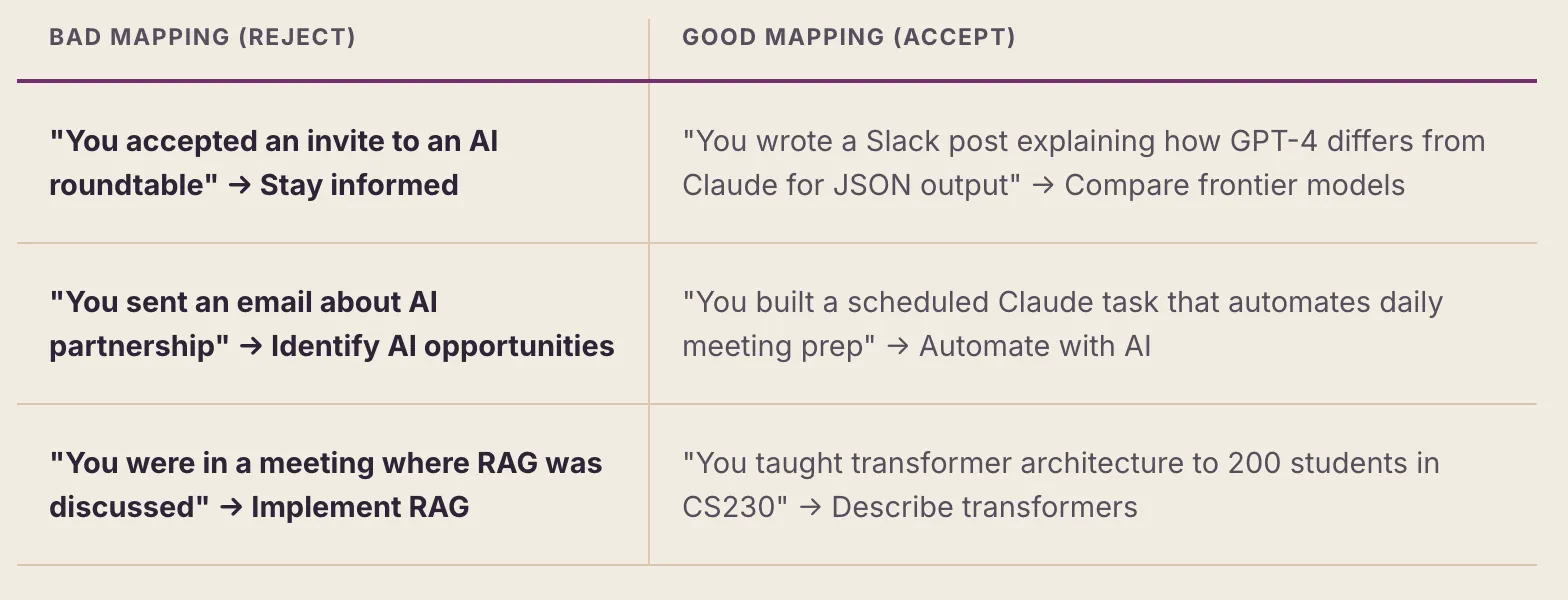
- Behavior mapping. Each evidence item is mapped to the single most relevant behavior ID from the user's assigned framework (configured per organization — see Section 5). The mapping must pass a relevance test: the evidence must directly demonstrate the specific behavior, not merely be tangentially related.
- Classification. Each evidence item is tagged with one of five evidence types ([D], [V], [T], [I], [N]) according to the classification taxonomy defined in Section 3.3.
- Storage. All new evidence is merged into the local profile on the user's device. The classification step never assigns scores — scoring is a separate, deterministic step (Section 4).
Separation of concerns.The scan-and-classify step is deliberately constrained to evidence collection and classification only. Scoring is performed exclusively by the deterministic engine, also in the desktop app (Section 4). This separation ensures that AI judgment is bounded to classification — a task where LLMs excel — while scoring follows a transparent, auditable formula.
3.3 Evidence Classification Taxonomy
Every evidence item is assigned exactly one of five types, which carry different evidential weight — reflecting the strength of the inference each supports. Each carries a different weight and requires different judgment criteria:
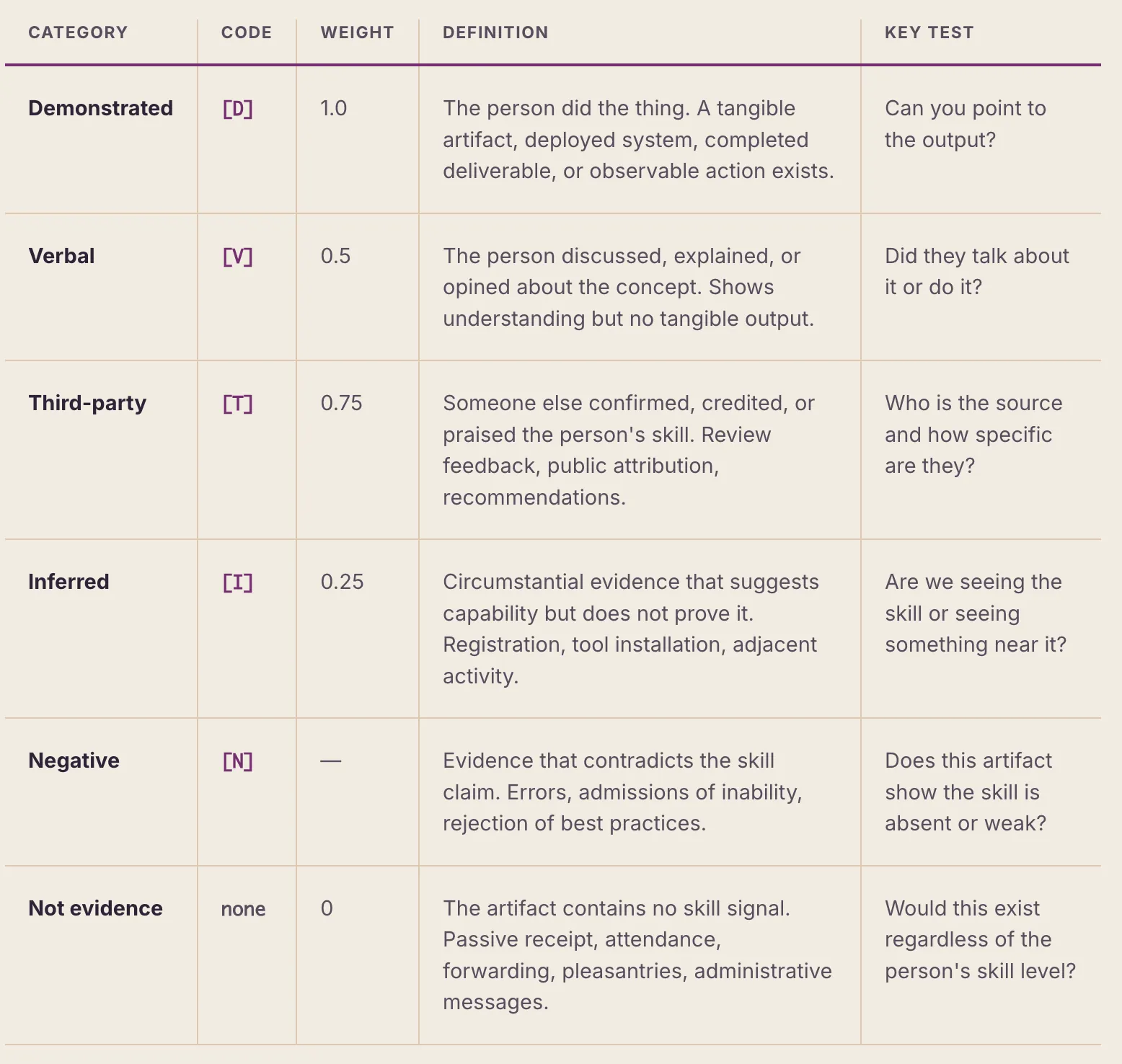
The single most important distinction is doing vs. talking: producing an artifact ([D]) is materially stronger than describing the work ([V]). A conversation, however knowledgeable, is Verbal — not Demonstrated.
3.4 The Demonstrated vs. Verbal Distinction
This is the single most important distinction in the system. Getting it wrong inflates profiles and undermines validity.
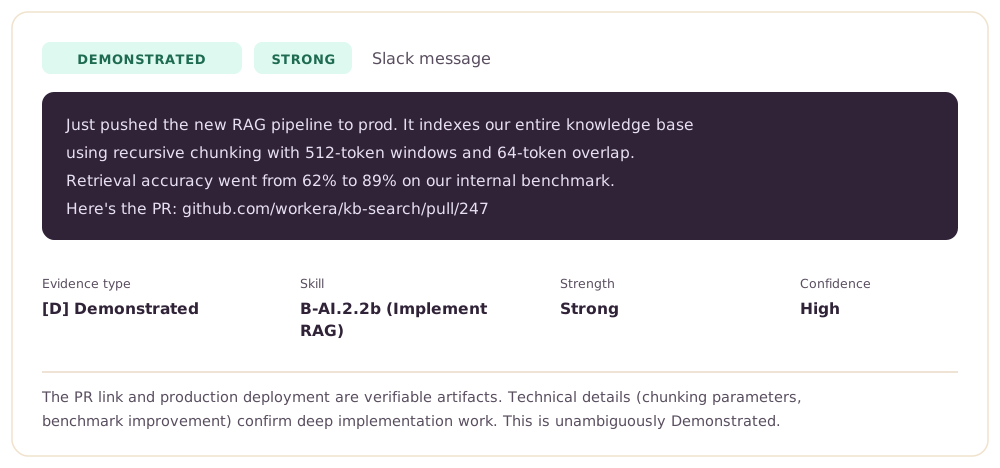
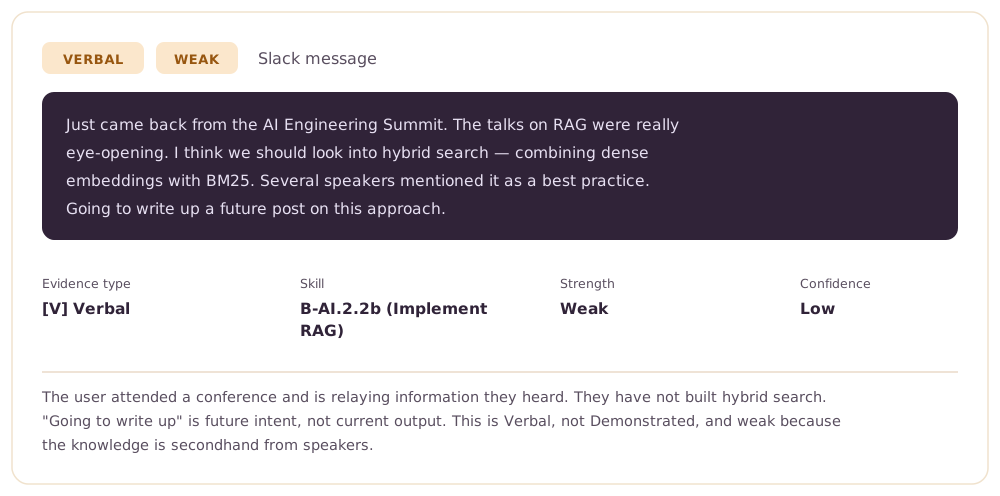
Demonstrated [D] means the person produced something. There is an artifact — code committed, a document written, a system deployed, a presentation delivered, a process established. The evidence exists independently of the person's claim.
Verbal [V] means the person talked about something. They explained a concept in a meeting, discussed an approach in Slack, or described their understanding in an email. The evidence depends entirely on their words.
The fundamental testIf you removed the person's self-description, would the evidence still exist? If yes, it's Demonstrated. If no, it's Verbal.
The "NOT Evidence" Filter
The following are explicitly excluded from evidence collection. They appear AI-related but do not demonstrate any skill:
- Receiving an email, invitation, or message about AI (passive receipt, not active demonstration)
- Accepting or declining a meeting or calendar event (scheduling is not a skill)
- Being mentioned in a conversation without contributing (passive presence)
- Forwarding an article or link without commentary (no original thought demonstrated)
- Attending a meeting where AI was discussed but the person did not contribute
- Having a role that involves AI (this may be [I] at best, never [D] or [V])
- Using AI tools for routine tasks that anyone would do (e.g., basic spell-check, auto-complete)
The fundamental test: "Did this person actively DO or SAY something that required this specific AI skill?" If the answer is "no, it just happened near them," it is not evidence.
The Relevance Test
Before mapping evidence to a behavior, the classification agent must verify direct relevance. The question is: "Does this evidence specifically show THIS skill, or is it just vaguely related to AI?"
Second-Person Framing
All evidence descriptions are written in second person, as a coach addressing the individual: "You explained...", "You built...", "You teach...". This serves two purposes: it makes the evidence immediately meaningful when the user reads their profile, and it forces the classification agent to specify exactly what the person did (who, where, what, when) rather than writing abstract summaries.
4. Deterministic Scoring Architecture
4.1 Design Principle: Formula-Based, Not AI Judgment
A deliberate architectural decision separates the system into two domains: AI-powered classification and formula-based scoring. The classification step uses LLM capabilities where they excel — reading natural language, understanding context, and classifying evidence into structured categories. But the scoring itself is entirely deterministic: a fixed set of rules weighs the evidence by type and source and produces a score.
This separation provides three guarantees:
- Reproducibility. Given the same evidence, the scoring engine will always produce the same score. There is no stochastic element, no temperature setting, no prompt variation in scoring.
- Auditability. Every score can be explained by citing the specific rule that was applied and the evidence counts that triggered it. The system stores the rule number and explanation alongside every score.
- Predictability. Users and administrators can understand, in advance, what evidence is needed to reach a given score. This makes the system a developmental tool, not a black box.
4.2 Bloom's Taxonomy Alignment
Behavior scores use a four-level scale aligned to Bloom's Revised Taxonomy (Anderson & Krathwohl, 2001). Each level represents a qualitatively different depth of skill, not merely a quantitative increase:
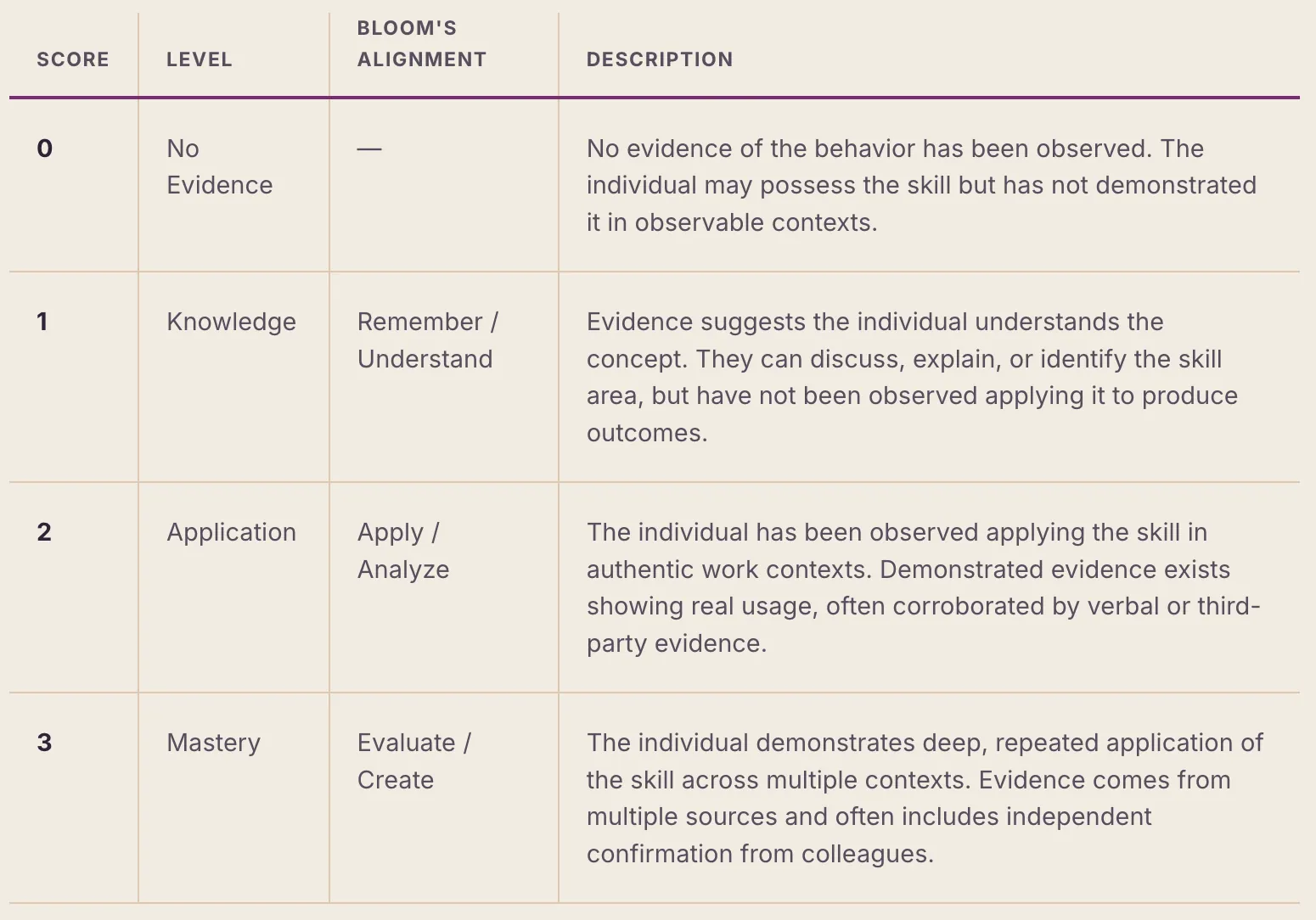
Bloom's verb alignment.Each behavior in the framework is associated with a specific Bloom's verb (Explain, Compare, Design, Implement, Evaluate, etc.) that anchors the expected cognitive level.
4.3 How a Behavior Is Scored
The scoring engine evaluates each behavior independently. It looks only at the behavior's current (non-stale) evidence — how much there is, what types it spans, and how many independent sources it comes from — and applies a fixed set of rules to land on a 0–3 score. The same evidence always yields the same score; there is no model judgment at this stage.
The logic follows a consistent ladder:
- Negative evidence comes first. Clear counter-evidence pulls the score down — it is the only thing that can.
- Mastery (3) requires demonstrated work that is both repeated and independently corroborated — multiple artifacts across more than one source, ideally confirmed by someone else.
- Application (2) requires real demonstrated work, strengthened by a second angle — either independent confirmation or a separate supporting source.
- Knowledge (1) follows from a single piece of credible evidence — one artifact, a third-party mention, a substantive discussion, or (at most) circumstantial/inferred evidence.
- No evidence (0) is the default when nothing relevant has been observed.
Two principles shape the ladder: doing outranks talking (demonstrated work counts for more than discussion, which counts for more than circumstantial signals), and convergence matters (the same skill seen in more places, and confirmed by others, scores higher than a single isolated signal). The exact thresholds are tuned over time and are intentionally not published here.
Worked Example
Suppose, after a few weeks of scanning, a behavior has accumulated three pieces of evidence from three different sources: a demonstrated artifact (a system the person built), a verbal contribution (explaining the approach in a meeting), and a third-party mention (a colleague crediting their work). That combination — real demonstrated work, plus independent confirmation, across multiple sources — lands the behavior at 2 (Application). Adding a second demonstrated artifact in a new context would push it toward 3 (Mastery).
4.4 Score Protection: High-Water Marks
Skills, once demonstrated, do not typically disappear. To reflect this, the system keeps a high-water mark for each behavior — the highest score it has reached — and holds the score there even when recent evidence is thinner. A score only drops in response to explicit negative evidence, so users are never penalized for a quiet week.
4.5 Evidence Staleness
Not all evidence ages at the same rate. Each behavior is tagged perishable (fast-moving skills) or durable (slower-changing skills): evidence ages out of a shorter window for perishable behaviors and a longer one for durable behaviors. Once it ages out it no longer counts toward the current score — though the high-water mark keeps the score from dropping for that reason alone. Standing facts such as job titles and ongoing roles never go stale.
5. Skill Framework
5.1 Capability → Skill Area → Behavior Hierarchy
The skill framework uses a three-level hierarchy that moves from broad organizational programs to specific, observable behaviors. Crucially, the framework is configured per organization — there is no single fixed catalog baked into the product. Each organization defines its own programs and behaviors in the admin dashboard, and the desktop app fetches each person's assigned framework from the server at runtime.
- Program (capability) is the top-level organizational requirement — for example "AI Native Work Habits" or "Leadership." A program carries a target score on a fixed scale and can be shared across all roles or assigned to specific role types. An organization may run several programs at once.
- Skill Area groups related behaviors into thematic clusters within a program (e.g., "Customer Centricity" or "Ownership and Accountability").
- Behavior is the atomic unit of measurement. Each behavior is a specific, observable action statement anchored by a Bloom's verb. Behaviors are scored individually on the 0–3 scale.
Behaviors are not limited to AI skills. Because the framework is org-defined, a program can measure general professional competencies — communication, management, customer focus, ownership — alongside (or instead of) AI-specific behaviors.
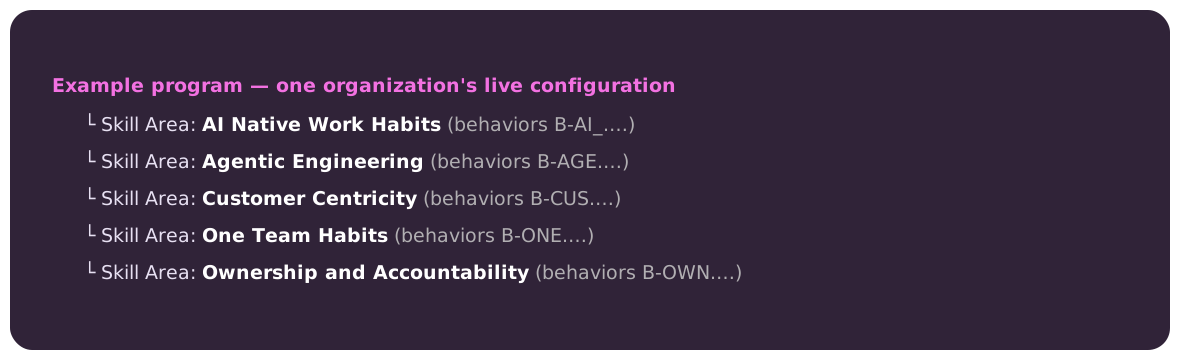
5.2 Starter Frameworks & Signature Packs
To help organizations get started, the product ships signature starter packs — pre-authored blueprints (e.g., AI Fundamentals, Agentic Engineering, Staying Current, Leadership, Management, Communication) that an admin can adopt as-is or use as a starting point. A starter pack is just a seed: once adopted, its behaviors live in the organization's framework and can be edited freely. Each behavior — whether from a starter pack or authored from scratch — is designed to be:
- Observable — demonstrable through workplace artifacts, conversations, or actions that can be captured by connected tools
- Distinct — non-overlapping with other behaviors in the framework
- Actionable — something the individual can improve through deliberate practice
- Universal — relevant across roles, from individual contributors to executives
There is no fixed default catalog — your organization's skill areas and behaviors are whatever its admins configure.
5.3 Framework Customization
Customizing the framework is the normal way the system is used, not an advanced option — every organization configures its own. Administrators work through the admin dashboard to match their organization's skill requirements. Options include:
- Adding behaviors: New behaviors can be added to any skill area. Each new behavior requires a description, skill-area assignment, and a Bloom's verb anchor (the ID is generated automatically).
- Removing behaviors: Behaviors that are not relevant to the organization's context can be removed. This affects all users and recalculates scores.
- Adjusting targets: The program target score can be adjusted to set organizational expectations.
- Role-specific programs: Programs can be shared across all roles or assigned to specific role types, so different cohorts can be measured against different behavior sets.
When the framework changes, the desktop app detects the update (it checks for framework updates periodically) and notifies the user. New behaviors appear in their profile with a score of 0 and are immediately eligible for evidence collection.
5.4 Skill Listening
The AI landscape evolves rapidly. New tools, techniques, and competencies emerge frequently. Skill Listening is a system capability that monitors industry developments and suggests new behaviors for the framework.
Each skill suggestion includes:
- Proposed behavior description with Bloom's verb alignment
- Source — the industry signal that prompted the suggestion (e.g., an emerging standard or a widely-adopted new tool)
- Rationale — why this behavior is becoming important (e.g., "a new capability is becoming a standard part of how enterprise teams work, and a large share of organizations are now evaluating adoption")
Suggestions enter a review queue in the admin dashboard with three possible statuses: Pending(awaiting admin review), Approved (added to the framework), or Dismissed (rejected by admin). This ensures that framework evolution is guided by industry trends but controlled by organizational judgment.
6. Privacy Architecture
6.1 Design Principle: Evidence Stays Local
The privacy architecture is governed by a single, inviolable principle: raw evidence never leaves the individual's device. The system is designed so that a user's messages, emails, meeting transcripts, code, and other workplace artifacts are processed entirely on their own machine. The organizational dashboard receives only numeric scores — never the underlying evidence.
This principle is not merely a policy choice; it is enforced by the system architecture:
- The scan-and-classify step runs on the user's machine and writes evidence to local storage only.
- The desktop app computes scores from the local evidence and stores the full evidence-bearing profile only locally.
- The server sync function explicitly strips all evidence before transmission.
- The server has no facility to receive or store evidence remotely — only scores.
6.2 Data Flow
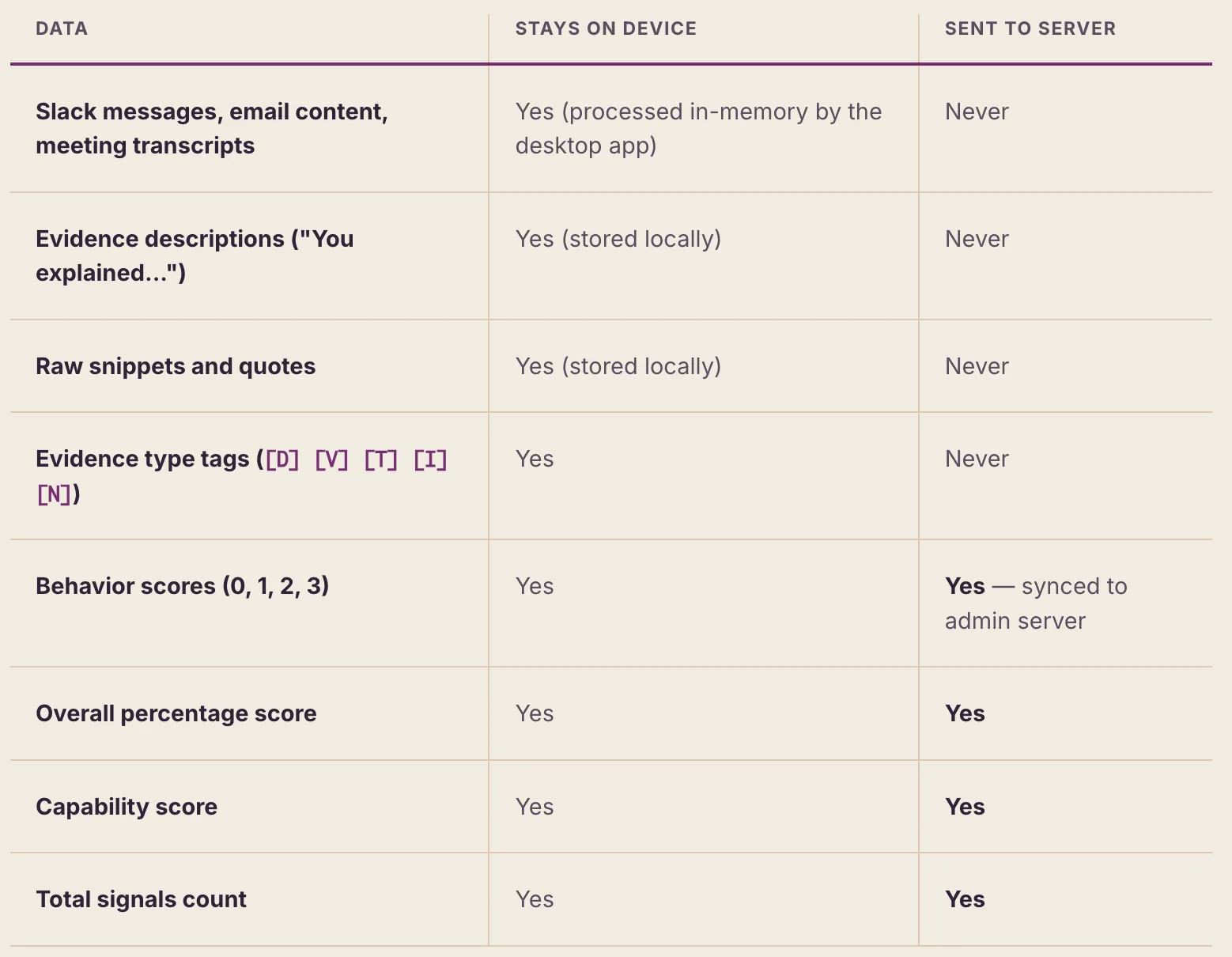
6.3 Score-Only Sync Model
When the desktop app syncs, it sends only scorable data — the user's behavior scores, plus roll-up figures (overall percentage and capability score). It explicitly excludes all evidence: no descriptions, no raw snippets, no message or document content. What leaves the device is a compact set of numbers, not the underlying artifacts.
This means that even if the admin server were compromised, an attacker would gain access only to numeric scores — not to the individual's messages, emails, or meeting transcripts.
6.4 No Central Evidence Store
Evidence is stored only on the user's own device. The server has no facility to receive or persist evidence — its intake path accepts scores and rejects anything else. There is no central repository of the messages, documents, or transcripts behind a score.
The practical consequence is that a manager viewing their team's scores in the admin dashboard sees: "Taylor: AI Fundamentals 2.3/3.0, Prompt Engineering 1.8/3.0" — but has no access to the specific messages, emails, or artifacts that generated those scores. Only the individual sees their own evidence through the desktop app.
7. Recommended Journey
The following timeline represents the recommended deployment sequence for organizations adopting the Skills Inferencing System. Each phase builds on the previous one, gradually adding signal types.
7.1 Day 0: Align
Activity: Leadership alignment and program onboarding.
Who: L&D leaders, managers, executive sponsors.
What happens: Admin configures the framework in the dashboard — adopting and tailoring starter packs or authoring behaviors from scratch — and makes any customizations needed for the organization's context. Invitations are sent to team members. Organizational goals (e.g., "80% of the engineering team at Application level in Agentic Engineering by Q3") are set as targets.
7.2 Week 1+: Observe
Activity: Automatic evidence scanning begins.
Who: System (automated), with the user's connected tools.
What happens: The desktop app is installed and begins scanning automatically on its recurring schedule. Over the first week, it accumulates evidence from connected sources. Scores begin appearing and evolving. The Activity tab in the desktop app shows scan results, new evidence discovered, and score changes. Users start seeing a living profile that reflects their actual work.
7.3 Ongoing: Coach
Activity: Personalized growth recommendations and practice.
Who: Individual participants.
What happens: The Coach tab surfaces the user's top growth areas (behaviors below mastery), sorted by impact. Each growth area includes a coaching insight explaining why the behavior matters and a "Practice in Claude" button that copies a roleplay prompt to the clipboard. Users can practice any skill by pasting the prompt into Claude, which acts as a roleplay partner (e.g., a CTO asking the user to compare frontier models, or a product designer asking the user to design an agentic workflow).
7.4 Week 2–4: Baseline Assessment
Activity: Workera assessment for baseline measurement.
Who: All participants (or targeted cohorts).
What happens: Participants complete the Workera assessment, producing a standardized, proctored measurement of their AI skills. This assessment signal combines with the observation signal to create a two-lens view. Gaps between assessment and observation are surfaced in the admin dashboard.
7.5 Planned: Manager Review (Not yet implemented)
Activity: Manager-rated signal collection.
Who: Managers, using the admin dashboard.
Status: This signal type is planned but not yet available in the current product.
When implemented: Managers will review their direct reports' skill profiles and provide ratings based on their contextual knowledge. The manager signal (20% weight) will add expert judgment to the composite. The admin dashboard will provide tools for managers to see team-level patterns and identify coaching opportunities.
7.6 Ongoing: Continuous Multi-Signal
Activity: All available signal types operating in concert.
What happens: As the program matures and additional signal types are implemented, composite scores incorporate more perspectives and become more reliable. Currently, the system supports the Observed signal. Assessed, Manager-Rated and Peer-Rated signals are planned for future releases. The goal is a reliable measurement of AI proficiency that can inform team composition, learning investment, and strategic planning.
8. Validity and Intended Use
8.1 Construct Validity
Construct validity — the degree to which the system measures what it claims to measure — is established through several design choices:
- Bloom's alignment. Each behavior is anchored to a specific Bloom's verb, ensuring that the four-level scoring scale maps to a recognized cognitive taxonomy. A score of 1 (Knowledge) genuinely reflects Remember/Understand-level demonstration, while a score of 3 (Mastery) requires Evaluate/Create-level evidence.
- ECD traceability. Every score can be traced through a complete Evidence-Centered Design chain: observable work product → evidence classification rule → scoring rule → behavior score. No inference is made without an auditable path.
- Behavior specificity. Each behavior describes a specific, observable action (not a trait or attitude). This grounds measurement in behavioral indicators rather than abstract constructs.
- Multi-method convergence. When multiple signal types (observed + assessed + rated) agree on a skill level, the convergent evidence strengthens the validity of the inference beyond what any single method could provide.
8.2 Intended Interpretations
What scores mean:
- A score of 2 (Application) means: "We have strong, multi-source evidence that this person applies this skill in their actual work."
- A score of 0 with low evidence coverage means: "We have not observed this skill, but our observation window may be limited."
- An overall score of 67% means: "Across the framework's behaviors, this person's observed proficiency averages to 67% of the maximum possible."
What scores do NOT mean:
- A score of 0 does NOT mean the person lacks the skill. It means the system has not observed evidence of it. Skills demonstrated in unmonitored contexts will not be captured.
- Scores are NOT comparable across individuals with different integration coverage. A person with 6 connected sources will naturally have more evidence opportunities than a person with 2.
- Scores are NOT employment decisions. They are developmental signals intended to inform growth, not to serve as sole inputs into promotion, compensation, or termination decisions.
8.3 Limitations
The system has known limitations that users and administrators should understand:
- Observation bias toward visible work. The system can only capture skills demonstrated through connected tools. A person who mentors others in hallway conversations, demonstrates AI skills in unrecorded meetings, or builds tools on personal machines will have these skills underrepresented. The system has an inherent bias toward digitally visible work.
- Source coverage gaps. Not all organizations use the same tools, and not every tool has a connector (e.g., Microsoft Teams is not yet integrated). A team that communicates primarily through un-integrated tools will have lower evidence coverage than a team using well-covered ones like Slack and Granola. Coverage also varies by individual based on which connectors they have authorized.
- LLM classification errors. The evidence classification step uses an LLM (Claude) to interpret natural language and assign evidence types. While the classification prompt is carefully structured with strict definitions, examples, and common pitfall warnings, LLMs can make errors. A conversation might be classified as [D] (Demonstrated) when it should be [V] (Verbal), or evidence might be mapped to the wrong behavior. The deterministic scoring engine mitigates this risk by requiring volume and convergence, but individual evidence items may be misclassified.
- Temporal sampling. Periodic scans capture a sample of activity, not a complete record. Short-lived messages, quickly-deleted content, or activity outside business hours may be missed.
- Cultural and linguistic factors. The system's ability to recognize evidence depends on the language and communication norms of the workplace. Teams that discuss AI informally or using non-standard terminology may have lower recognition rates.
8.4 Complementarity with Assessment
The most reliable skill inferences arise when observation and assessment signals are combined. The following matrix describes the four possible states and their interpretations:
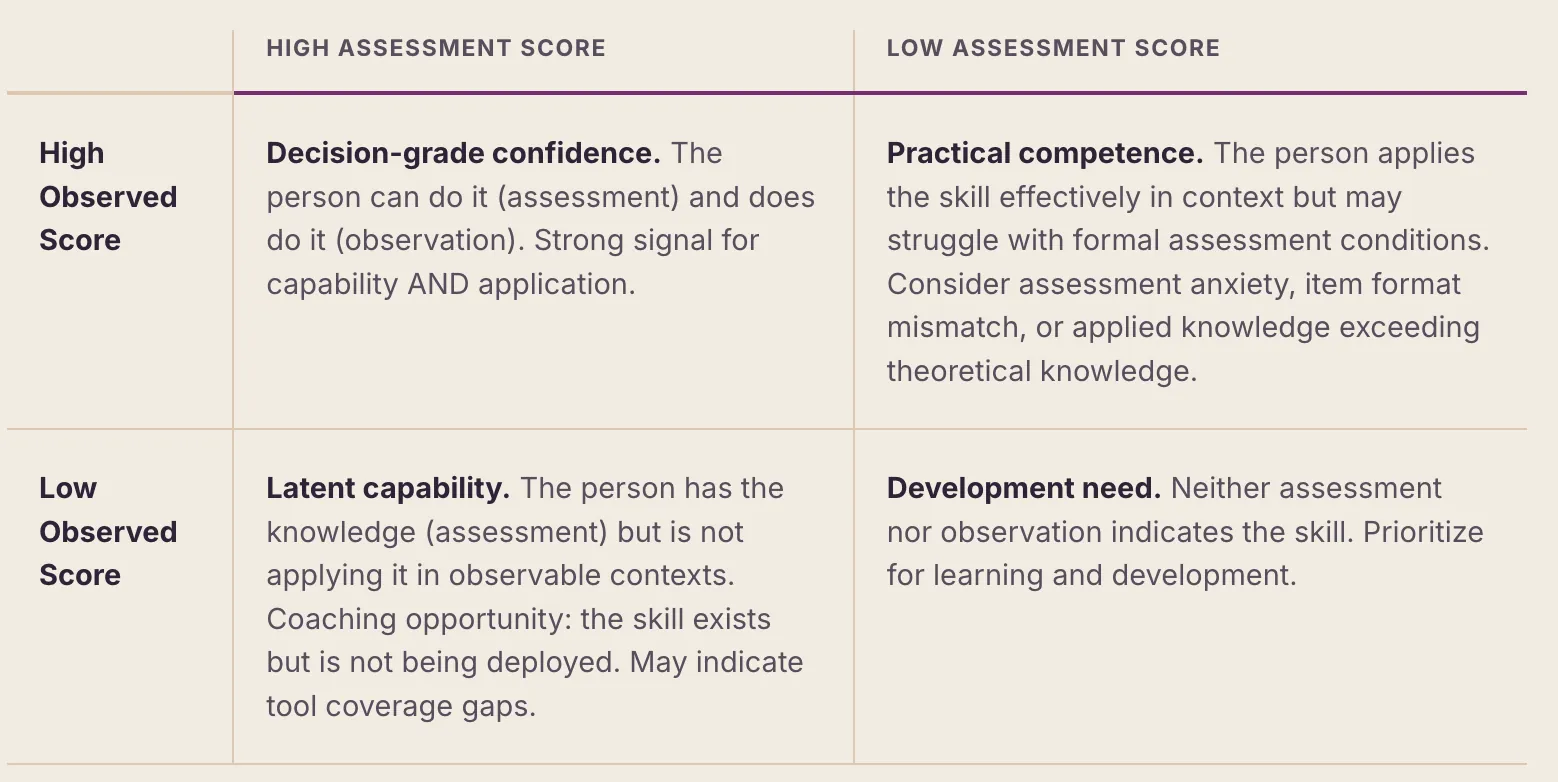
9. Program Analytics and Governance
9.1 Admin Dashboard Capabilities
The admin dashboard provides organizational leaders with a view into team-level AI proficiency without exposing individual evidence. The dashboard is organized around four primary views:
- Home: Organization-wide summary statistics — average AI proficiency score, number of active participants, scan coverage metrics, and trend charts showing progress over time.
- Skill Requirements: Framework management — view and edit the behavior catalog, review skill listening suggestions, customize the framework for the organization.
- People & Scores: Individual profile views showing behavior-level scores (but not evidence). Managers can view their direct reports and identify coaching priorities.
- Signal Configuration: Program settings including scan frequency, integration requirements, and composite weight adjustments.
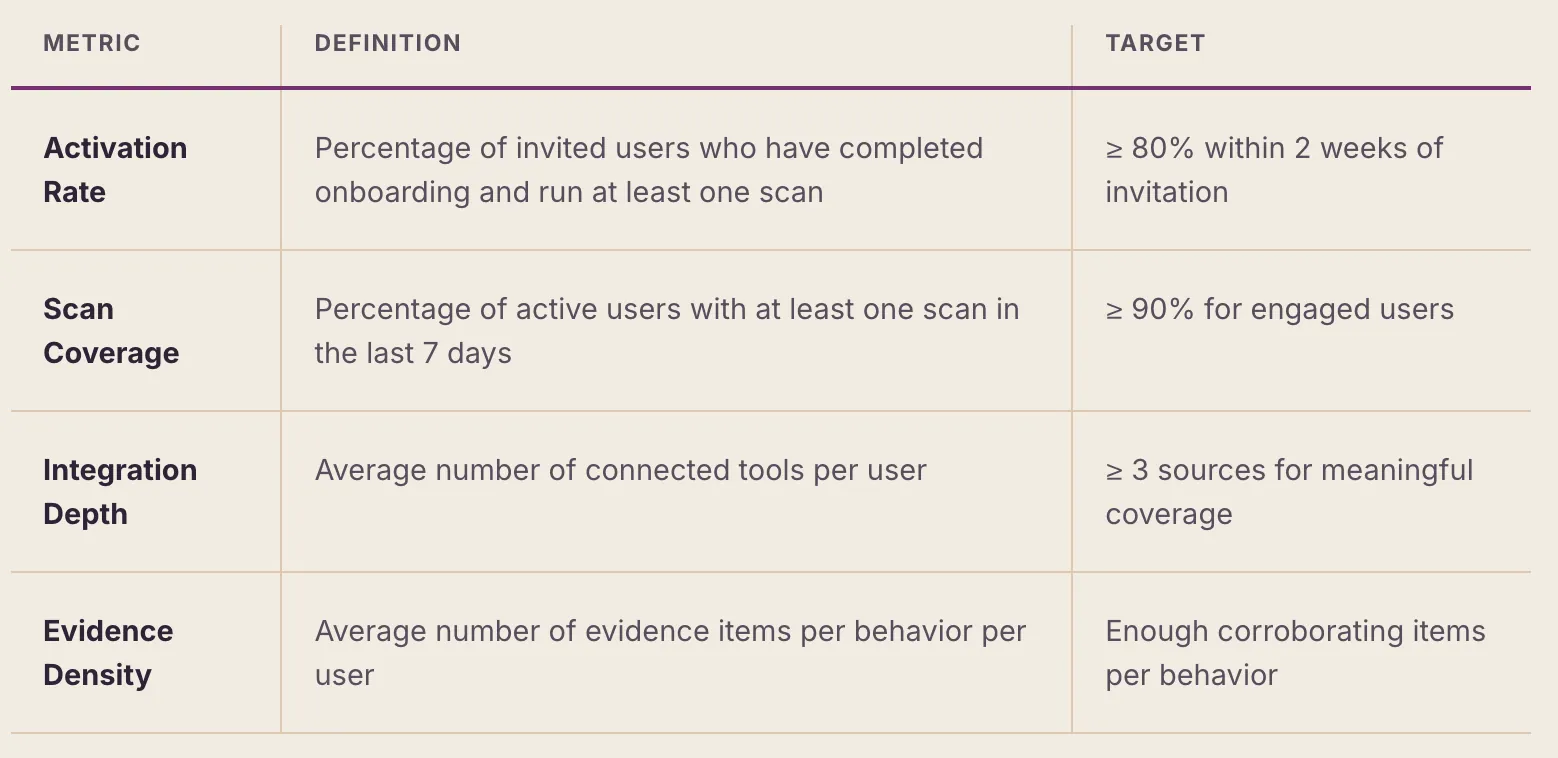
9.2 Adoption Metrics
The dashboard tracks several key adoption indicators:
9.3 Behavior Gap Analysis
The admin dashboard surfaces organizational-level behavior gaps: behaviors where the team's average score is below the expected level. This analysis enables L&D leaders to prioritize training investments where they will have the greatest impact. For example, if the team averages 0.8/3.0 on "Build AI business cases" but 2.4/3.0 on "Use AI daily," this suggests that the team is technically competent but needs strategic skill development.
Gap analysis can be filtered by department, team, role, and geography, enabling targeted interventions rather than one-size-fits-all training.
9.4 Access Control Model
The system uses a role-based access control model with two tiers:
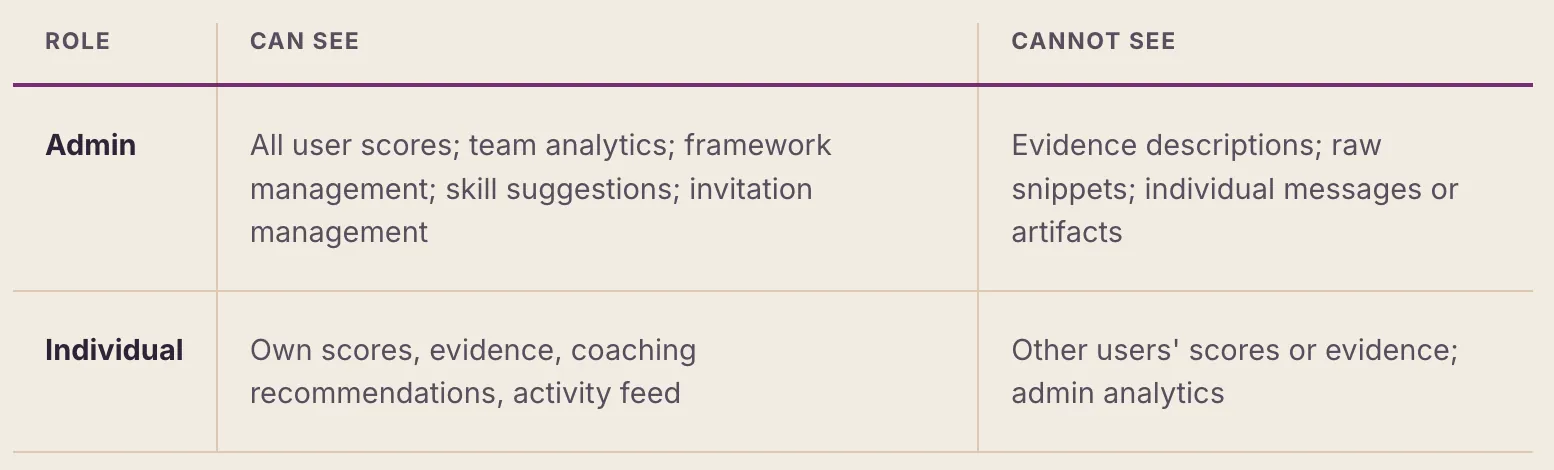
Authentication uses API keys generated at registration. Each user receives a unique key stored in the desktop app's secure configuration. Admin status is set per-user in the database and grants access to the admin dashboard views.